
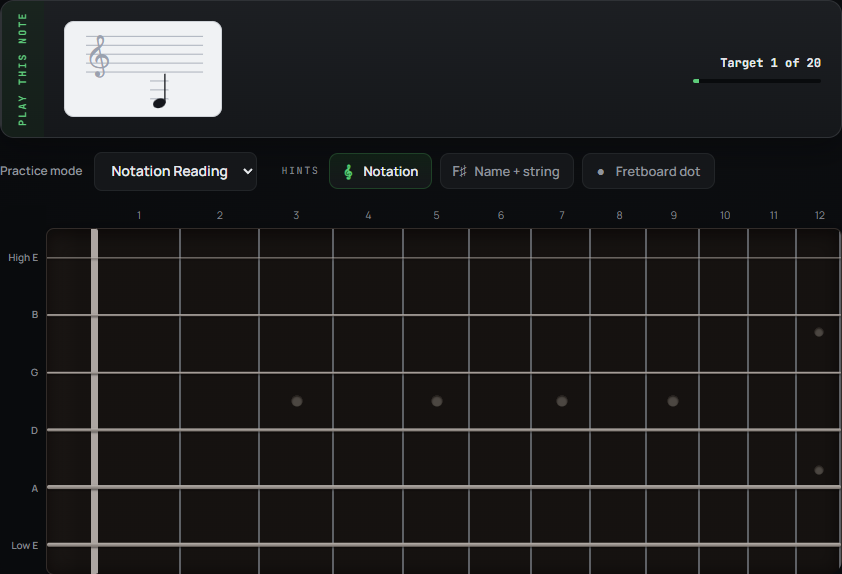
From the staff to the strings
You might recognise a written note but pause while finding it on the guitar. Or you might know the fretboard and still need time to read the staff. Notation Reading lets you practise making that connection.
Look at the note, find a position and play it. FretGOAT checks the pitch it hears and gives immediate feedback. It cannot tell which physical string or fret you used.
A foundation for sight-reading
Each prompt is a single note. The focus is recognising its pitch and finding it on your instrument. These exercises do not cover rhythm, keeping time or reading through a continuous musical passage.
Use this alongside playing written music to work on the note-finding step at your own pace.
Start small. Use a hint when you need one.
Open Practice and choose Notation Reading. In Configure session, choose the strings, fret range and note pool you want to work on. Start with a small area, then broaden it as the notes become familiar.
The mode shows the staff without the note name or answer dot. You can reveal those hints when you need help, then hide them to practise finding the next notes yourself.
Play your guitar, or click the fretboard
Connect an audio interface or use a microphone and configure audio input. FretGOAT listens for your notes in the browser; it does not record or upload your raw guitar audio.
Without audio, choose “Practise by clicking the fretboard” to answer the same note prompts on screen. For guitar input, use the latest desktop Chrome on Windows 11 or macOS; an audio interface gives the cleanest signal.